How to Upgrade Debian 10 to Debian 11

One of the advantages of the Debian operating system is easy to upgrade to the newer version. Login to your Debian 10 server using SSH or console. Install all available software updates with the command Remove any unused packages Change /etc/apt/sources.list Make a backup of the file Edit the file /etc/apt/sources.list In the file, change … Read more

How to install NVIDIA CUDA on Debian 10

CUDA® is a parallel computing platform and programming model developed by NVIDIA for general computing on graphical processing units (GPUs). With CUDA, developers are able to dramatically speed up computing applications by harnessing the power of GPUs. We will install NVIDIA CUDA on a Debian 10 server. Run the following commands as user root. If … Read more

Debian 11.0 Bullseye released

Debian 11.0 Bullseye

Debian 11.0 Bullseye released on August 14th, 2021 is the next major Debian GNU/Linux distribution release. Debian 10 buster is designated as oldstable. https://www.debian.org/releases/bullseye/ Debian 12 “Bookworm” is the new testing distribution with is expected to be released in 2023. You can download the latest version of Debian 11.0 ISO from https://www.debian.org/download What is new … Read more

bash: locale-gen: command not found

debian linux

When I run locale-gen command, i get the following error root@netmon1:~# locale-gen en_US.UTF-8 bash: locale-gen: command not found root@netmon1:~# To see which package provide the locale-gen command, run boby@sok-01:~$ dpkg -S /usr/sbin/locale-gen locales: /usr/sbin/locale-gen boby@sok-01:~$ The command locale-gen is provided by package locales. To fix the error install package “locales” with the command apt install … Read more

Reinstall Kernel in Ubuntu/Debian

reinstall ubuntu kernel

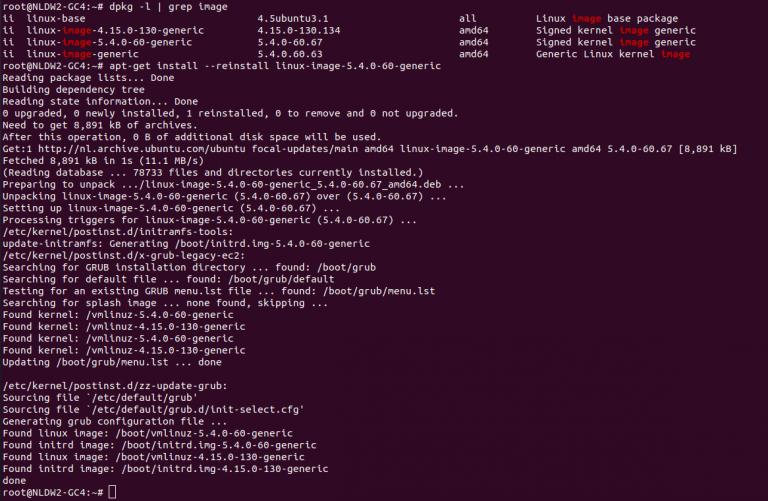
To reinstall Kernel in Ubunru, you need to find the version of kernal installed, for this run dpkg -l | grep linux-image Or you can use command, find the kernel version you need to install apt-cache search linux-image Once you have the name of linux-image package you need to install, you can run apt-get install … Read more

Enable FTP for EasyEngine Website

To Enable FTP for EasyEngine web sites, we need to install pure-ftpd. On Ubuntu/Debian, run apt install -y pure-ftpd Enable virtial FTP users ln -s /etc/pure-ftpd/conf/PureDB /etc/pure-ftpd/auth/PureDB touch /etc/pure-ftpd/pureftpd.pdb In EasyEngine, we sites files are owned by www-data user, this user have a UID of 33. By default pure-ftpd won’t allow this. To enable users … Read more

Uninstalling Software in Debian Server

To uninstall a software on Debian server, run apt remove PKG_NAME Example To all installed software with specific name, run dpkg-query -l PKG_NAME Example root@lab:~# dpkg-query -l ‘nginx*’ Desired=Unknown/Install/Remove/Purge/Hold | Status=Not/Inst/Conf-files/Unpacked/halF-conf/Half-inst/trig-aWait/Trig-pend |/ Err?=(none)/Reinst-required (Status,Err: uppercase=bad) ||/ Name Version Architecture Description +++-==============-================-============-========================================================= ii nginx 1.14.2-2+deb10u3 all small, powerful, scalable web/proxy server ii nginx-common 1.14.2-2+deb10u3 all small, … Read more

apt-cache

To search for available packages, run apt-cache search PKG_NAME Example boby@sok-01:~$ apt-cache search wget devscripts – scripts to make the life of a Debian Package maintainer easier wget – retrieves files from the web abcde – A Better CD Encoder apt-mirror – APT sources mirroring tool axel – light command line download accelerator filetea – … Read more