Auto upgrade software in Ubuntu/Debian
To auto upgrade software packages in Ubuntu/Debian, install apt install -y unattended-upgrades Edit vi /etc/apt/apt.conf.d/50unattended-upgrades In this file, you can configure various settings. See apt
PowerDNS is an OpenSource DNS server. Update apt repo apt-get update && apt-get upgrade -y On Ubuntu, systemd-resolved listen to port 53. This is a local DNS resolver, we need to stop this service before we can install PowerDNS. systemctl disable systemd-resolved systemctl stop systemd-resolved rm -f /etc/resolv.conf echo “nameserver 1.1.1.1” > /etc/resolv.conf echo “nameserver … Read more
On Ubuntu, some times notifications steal focus from current application. This annoying when you are working on terminal. This is due to start focus feature of gnome when your mouse is over the notification area. boby@sok-01:~$ gsettings get org.gnome.desktop.wm.preferences focus-new-windows ‘smart’ boby@sok-01:~$ We need to change the value of focus-new-windows from smart to strict. This … Read more
On Debian and Ubuntu servers, you can download a package using apt download command. apt download PKG_NAME Package will get downloaded to current working directory. Better do this to /tmp to avoid permission errors. Method 2 If you want to download package and dependencies, then use apt-get install –download-only PKG_NAME This will download the package … Read more
To block packages from upgrading, you can use command apt-mark hold. apt-mark hold PKG_NAME Example apt-mark hold libtomcat8-java tomcat8 tomcat8-admin tomcat8-common To list packages that are on hold, run root@ip-172-26-8-193:~# apt-mark showhold libtomcat8-java tomcat8 tomcat8-admin tomcat8-common root@ip-172-26-8-193:~# If you want to remove block, you can use apt-mark unhold command. apt-mark unhold libtomcat8-java tomcat8 tomcat8-admin tomcat8-common … Read more
On Ubuntu/Debian server, apache run as user www-data. When you install Apache web server on your local computer for developement purpose, it may be easier to run Apache as your user. If you run Apache as www-data user, you will need to chmod folders 777 for yoru web application to write to a folder like … Read more
To install wireguard VPN on ubuntu, run apt update apt install software-properties-common apt install linux-headers-$(uname -r) add-apt-repository ppa:wireguard/wireguard apt-get update apt-get install wireguard Generate Keys cd /etc/wireguard umask 077 wg genkey > privatekey cat privatekey | wg pubkey > publickey Configure wireguard You can generate wireguard configuration using https://www.wireguardconfig.com
On my local computer, i have installed openssh-server, but i don’t want it always enabled. To disable openssh-server from auto start on boot, run systemctl disable ssh Example root@lab:~# systemctl disable ssh Synchronizing state of ssh.service with SysV service script with /lib/systemd/systemd-sysv-install. Executing: /lib/systemd/systemd-sysv-install disable ssh Removed /etc/systemd/system/sshd.service. Removed /etc/systemd/system/multi-user.target.wants/ssh.service. root@lab:~# If you want to … Read more
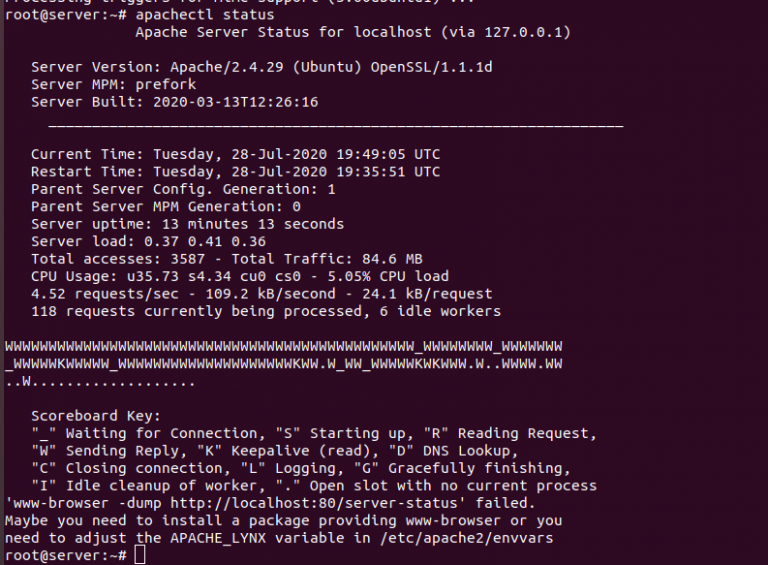
On a Ubuntu server, run i run apachectl status, i get following error. root@server:~# apachectl status /usr/sbin/apachectl: 113: /usr/sbin/apachectl: www-browser: not found ‘www-browser -dump http://localhost:80/server-status’ failed. Maybe you need to install a package providing www-browser or you need to adjust the APACHE_LYNX variable in /etc/apache2/envvars root@server:~# To fix error, install lynx text based browser. apt … Read more
After upgrading MariaDB on Ubuntu server, i got following error root@server:~# mysql ERROR 1524 (HY000): Plugin ‘unix_socket’ is not loaded root@server:~# Users created worked fine. Only root user had this error. To fix, you need to enable auth_socket.so plugin. Edit file vi /etc/mysql/mariadb.conf.d/50-server.cnf Find [mysqld] Add below plugin-load-add = auth_socket.so Resatrt MariaDB systemctl restart mysqld … Read more
When running apt update, i get following error W: An error occurred during the signature verification. The repository is not updated and the previous index files will be used. GPG error: http://packages.cloud.google.com cloud-sdk-jessie InRelease: The following signatures couldn’t be verified because the public key is not available: NO_PUBKEY 6A030B21BA07F4FB To fix this error, run apt-key … Read more
Ubuntu Server 20.04 set static IP with netplan Ubuntu Server 20.04 configure OVH failover IP Configure KVM Bridge Network using netplan Configure VPS IP address in OneProvider Server