bash: man: command not found
When running man command on a debian server, i get error root@lab:~# man sftp -bash: man: command not found root@lab:~# This is…

When running man command on a debian server, i get error root@lab:~# man sftp -bash: man: command not found root@lab:~# This is…
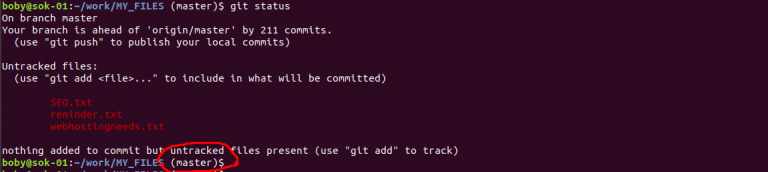
When working with git, to avoid accidental commit to wrong branch, it will be better if terminal show the branch name you…
Reverse-DNS/PTR is used by mail servers. It is used to map an IP address to FQDN or hostname. To find Reverse DNS…
To disable SELinux Method 1 sed -i ‘s/SELINUX=enforcing/SELINUX=disabled/’ /etc/selinux/config setenforce 0 Method 2 edit file vi /etc/selinux/config Find SELINUX=enforcing Replace with SELINUX=disabled…
For linux to show hidden files when you type ls command Edit ~/.bashrc vi /root/.bashrc Add line alias ls=’ls -la –color’ Save…
Here is some example of using curl to login to site, use cookie to do further requests. curl -k –cookie-jar ./cookies_hotfile –data…
chown command is ued to change ownership of a file or folder In this example ownership of folder public_html to username and…
yum install at Enable atd [root@server12 ~]# service atd status atd is stopped [root@server12 ~]# chkconfig –list | grep atd atd 0:off…
To test if pop3 mailbox work using telnet, use telnet MAIL_SERVER_IP 110 user YOUR_EMAIL_ADDRESS pass YOUR_EMAIL_PASSWORD Once logged in, you can use…
To auto upgrade software packages in Ubuntu/Debian, install apt install -y unattended-upgrades Edit vi /etc/apt/apt.conf.d/50unattended-upgrades In this file, you can configure various…
rpmquery command allow you to check if a specific rpm package installed on your computer. rpmquery PKG_NAME Example See rpm
PowerDNS is an OpenSource DNS server. Update apt repo apt-get update && apt-get upgrade -y On Ubuntu, systemd-resolved listen to port 53.…