Blog

  • How to Install Elasticsearch in Docker

    How to Install Elasticsearch in Docker

    To Install Elasticsearch with Docker, first, you need to install docker on your server with command

    wget -qO- https://get.docker.com/ | sh
    

    Docker images for Elasticsearch are available from

    https://hub.docker.com/_/elasticsearch

    You can see all available versions at

    https://hub.docker.com/_/elasticsearch?tab=tags&page=1&ordering=last_updated

    To create an elasticsearch container, run

    docker run -p 9200:9200 -p 9300:9300 -e "discovery.type=single-node" docker.elastic.co/elasticsearch/elasticsearch:7.5.2

    To run it in the background

    docker run --name sok-elasticsearch --restart=unless-stopped \
     -d -p 9200:9200 -p 9300:9300 \
     -e "xpack.security.enabled=false" \
     -e "discovery.type=single-node" docker.elastic.co/elasticsearch/elasticsearch:7.5.2

    To verify if ElasticSearch works, run

    boby@sok-01:~$ curl localhost:9200
    {
      "name" : "730d385743b3",
      "cluster_name" : "docker-cluster",
      "cluster_uuid" : "V9XDIPXZQt-Tfgcy8hoIDg",
      "version" : {
        "number" : "7.5.2",
        "build_flavor" : "default",
        "build_type" : "docker",
        "build_hash" : "8bec50e1e0ad29dad5653712cf3bb580cd1afcdf",
        "build_date" : "2020-01-15T12:11:52.313576Z",
        "build_snapshot" : false,
        "lucene_version" : "8.3.0",
        "minimum_wire_compatibility_version" : "6.8.0",
        "minimum_index_compatibility_version" : "6.0.0-beta1"
      },
      "tagline" : "You Know, for Search"
    }
    boby@sok-01:~$ 

    Back to Elasticsearch

  • Visual Code Studio Missing Tabs for Open Files

    Visual Code Studio Missing Tabs for Open Files

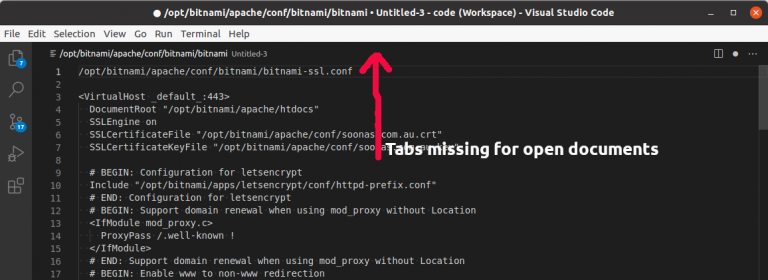
    Sometimes working on Visual Code Studio, I lose Tabs shown on top of the editor, this happens when I type, maybe I press some key combination by accident. Once this happened, Visual Codde Studio won’t show tabs for all the open documents, instead, it just shows a tab for the active document.

    visual code studio tabs missing

    To fix this, click on the “Wheel” icon in the bottom-left corner of Visual Code Studio.

    Visual Code Studio Settings

    Select Settings from the popup menu. On the next page, search for “Show Tabs”.

    Visual Code Studio Show Tabs

    If the checkbox is not selected, select it. There are user-level settings for this also, if that is disabled, you will see a warning message here, you can click on it to enable ‘Show Tabs” in user-level settings.

    Back to Visual Code Studio

  • Unmetered Dedicated Server Providers

    LARGE SITES AND HOSTS

    • xvideos.com – leaseweb for videos
    • redtube.com – choopa.com
    • zshare.net – choopa.com
    • tube8.com – WEBAZILLA.COM
    • xhamster.com – iptp.net
    • eskimotube.com – caro.net
    • aebn.net – caro.net
  • How to find Memory (RAM) available on a Linux Server

    To find memory, use the free command.

    free -m
    

    Will show memory in MB.

    The following is free -m on a server with 8 GB RAM.

    boby@sok-01:~$ free -m
                  total        used        free      shared  buff/cache   available
    Mem:           7949        5560         715         137        1673        1984
    Swap:          9536        2660        6876
    boby@sok-01:~$ 
    

    To display memory usage in a human friendly way, use

    free -h
    

    Example

    boby@sok-01:~$ free -h
                  total        used        free      shared  buff/cache   available
    Mem:          7.8Gi       5.4Gi       686Mi       143Mi       1.6Gi       1.9Gi
    Swap:         9.3Gi       2.6Gi       6.7Gi
    boby@sok-01:~$ 
    
  • How to find CPU of a Linux Server

    To find CPU used on a Linux system, run command

    cat /proc/cpuinfo
    

    Example

    boby@sok-01:~$ cat /proc/cpuinfo | grep -i "model name"
    model name	: AMD Ryzen 3 2200G with Radeon Vega Graphics
    model name	: AMD Ryzen 3 2200G with Radeon Vega Graphics
    model name	: AMD Ryzen 3 2200G with Radeon Vega Graphics
    model name	: AMD Ryzen 3 2200G with Radeon Vega Graphics
    boby@sok-01:~$ 
    
  • Local and remote exploit

    What is Local Exploit?

    A local exploit is a vulnerability in a Linux system that allows an ordinary user to gain root privileges by performing a certain sequence of actions. Generally, these exploits occur when a privileged application contains a bug that does not perform sufficient checks on the user before executing a command with root access.

    Local exploits do not by themselves allow intruders into the system, since an ordinary user account is needed first. However, it is often possible to gain this user access to a system if a password policy is not enforced or if the system provides user accounts as a service, for example, web hosting servers.

    What is Remote Exploit?

    Remote Exploit allows a hacker to get access on a server. Depending on what service is exploited, hackers will get user or root privileges on the exploited server. Sometimes, it is user privileges, then the hacker scans the server for any known Local Exploit, if he found one, he uses that to get root access on the server. Once a hacker gets root access they install rootkit (backdoors), that allow him to login and work on the server without tracked by the server administrator or other users.

  • Apache Location

    Apache Location

    To only allow requests from a specific IP to a location, use

    
      Require ip 59.92.71.53 51.38.246.115


      Require ip 59.92.71.53 51.38.246.115


    Add custom headers based on location

    
      Require ip 59.92.71.53 51.38.246.115
      Header edit Location ^/browse /internal/stream/browse
               AddOutputFilterByType INFLATE;SUBSTITUTE;DEFLATE text/html text/plain text/xml
               Substitute "s#\"/(fields|browse|machine|entries)#\"/internal/stream/$1#i"
    
    
  • Apache Proxy

    Apache Proxy

    To proxy requests in Apache

    <VirtualHost *:80>
    ServerName youdomain.com
    ProxyRequests Off
    ProxyPreserveHost On
    ProxyPass "/" "http://localhost:9292/"
    ProxyPassReverse "/" "http://localhost:9292/"
    </VirtualHost>​

    For proxying HTTPS traffic, use

    ProxyPreserveHost On
    SSLProxyEngine On
    ProxyPass / https://new-server-ip/
    ProxyPassReverse / https://new-server-ip/

    If remote SSL is invalid, you can disable SSL verification

    ProxyPreserveHost On
    SSLProxyEngine On
    
    # Bypass SSL certificate verification
    SSLProxyVerify none
    SSLProxyCheckPeerCN off
    SSLProxyCheckPeerName off
    SSLProxyCheckPeerExpire off
    
    ProxyPass / https://new-server-ip/
    ProxyPassReverse / https://new-server-ip/

    You need to enable following apache modules for proxy to work

    a2enmod proxy proxy_http ssl headers
    systemctl restart apache2

    The ProxyPreserveHost directive in Apache’s configuration is used in the context of a reverse proxy setup. When this directive is set to On, it tells Apache to pass the original Host header from the client request to the proxied server

    ProxyRequests Off – This directive turns off forward proxying. In forward proxying, the proxy server forwards client requests to the internet. By setting ProxyRequests Off, you are ensuring that Apache only acts as a reverse proxy, not a forward proxy.

    To proxy on cpanel server, use

    mkdir -p /etc/apache2/conf.d/userdata/ssl/2_4/USERNAME/DOMAIN.EXTN/
    vi /etc/apache2/conf.d/userdata/ssl/2_4/USERNAME/DOMAIN.EXTN/proxy.conf

    Add the following to the proxy.conf, change ports as needed

    ProxyPreserveHost On
    ProxyPass "/" "http://localhost:9292/"
    ProxyPassReverse "/" "http://localhost:9292/"

    Rebuild Apache config

    /scripts/rebuildhttpdconf
    service httpd restart

  • How to Delete Website (Virtual Server) in Virtualmin

    How to Delete Website (Virtual Server) in Virtualmin

    In the Virtualmin Hosting control panel, websites are called Virtual Server. To delete a website, click on the Virtualmin tab.

    Delete website in virtualmin

    From the dropdown menu, select the website you need to delete.

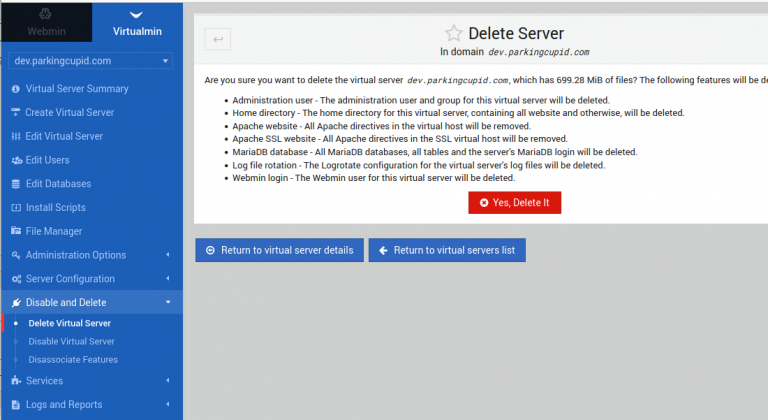
    On the left menu, click on “Disable and Delete’. Then click on “Delete Virtual Server” Link.

    Virtualmin > Domain > Disable and Delete > Delete Virtial Server
    

    It will ask for confirmation. Click on the red “Yes, Delete it” button to delete the website.

    See Virtualmin

  • MySQL ERROR 1114 (HY000) at line 2137: The table ‘X’ is full

    MySQL ERROR 1114 (HY000) at line 2137: The table ‘X’ is full

    When restoring a MySQL database, I get the following error

    root@localhost:~# mysql -u sok_user -p'serverok123' sok_db < parkingcupid.sql
    ERROR 1114 (HY000) at line 2137: The table 'field_data_field_monthly_price' is full
    root@localhost:~
    

    How to fix ERROR 1114 (HY000) table is full?

    First, check if the disk on the server is full.

    df -h
    

    In my case server disk was not full. Next try increasing the value for variables tmp_table_size and max_heap_table_size.

    Edit file

    vi /etc/mysql/mariadb.conf.d/50-server.cnf
    

    Under [mysqld] section, add

    tmp_table_size=256M
    max_heap_table_size=256M
    

    Restart MySQL

    systemctl restart mysql
    

    After this change MySQL database restore worked without giving any error.

    If the above solution did not fix your problem, check the following.

    Check Mysql variables innodb_data_file_path

    MariaDB [(none)]> select @@innodb_data_file_path;
    +-------------------------+
    | @@innodb_data_file_path |
    +-------------------------+
    | ibdata1:12M:autoextend  |
    +-------------------------+
    1 row in set (0.000 sec)
    
    MariaDB [(none)]> 
    

    If innodb_data_file_path variable have a max value set, you should update it. In this case, we don't have a max value.

    Verify innodb_file_per_table is set to 1.

    MariaDB [(none)]> select @@innodb_file_per_table;
    +-------------------------+
    | @@innodb_file_per_table |
    +-------------------------+
    |                       1 |
    +-------------------------+
    1 row in set (0.000 sec)
    
    MariaDB [(none)]>
    

    See MySQL

  • PHP Script to verify private key matches SSL certificate?

    OpenSSL command can be used to verify if an SSL certificate matches a private key file. You need to find the checksum for the SSL certificate and Private key, if both checksums are the same, then the key matches.

    To make this process easier, I created a PHP script to verify if the SSL certificate matches the private key provided.

    Create a file

    mkdir ~/bin/
    vi ~/bin/ssl-verify
    

    Add following content

    #!/usr/bin/php


    Make it executable

    chmod 755 ~/bin/ssl-verify
    

    To verify an SSL and key file, go to the folder where the SSL certificate and key file are present, then run the command

    ssl-verify